
Key Takeaways
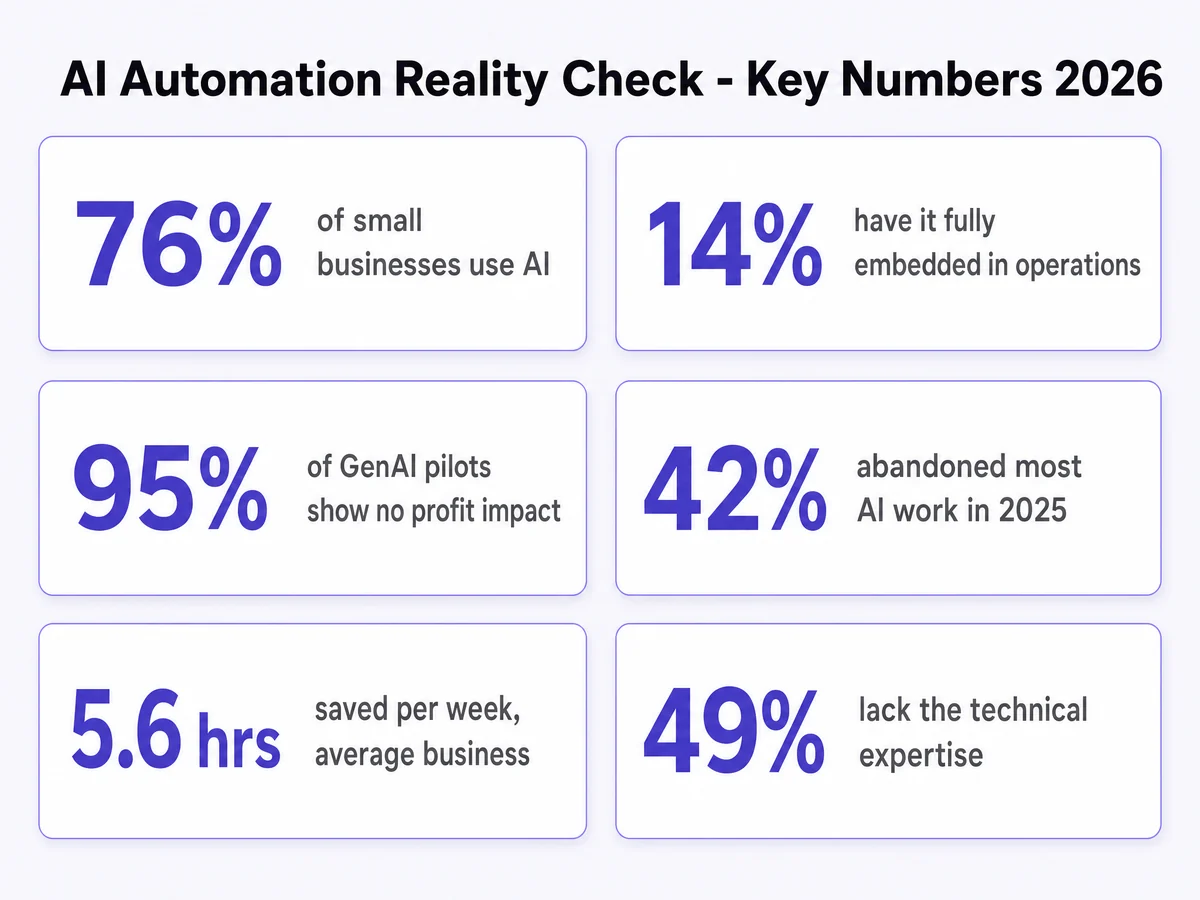
- 76% of small businesses now use AI, but only 14% say it is fully embedded in core operations — Goldman Sachs 10,000 Small Businesses Voices, 1,256 owners surveyed, February 2026.
- MIT’s NANDA study found roughly 95% of generative AI pilots produced no measurable P&L impact within about six months of deployment.
- S&P Global found 42% of companies abandoned most of their AI initiatives in 2025, up sharply from 17% the year before.
- The average small business saves about 5.6 hours a week with AI — real, but a long way from the “replace your team” pitch.
- The jobs that work are narrow and repetitive: repeat questions, missed calls, booking, reminders, follow-up, review requests, data entry.
- The jobs that fail are the judgment ones: pricing, negotiation, complaints, and any process nobody has written down yet.
- Goldman Sachs also found 49% lack the technical expertise to use AI effectively, which is why maintenance decides survival more than the build does.
Most articles answering this question list forty things AI “can” do. That list is not useful, because roughly half of it will not survive contact with a real business that has six staff and a phone that rings during service.
This one is built the other way round: from the jobs that are still running six months after handover. The short version is that AI automation is good at the work that surrounds your customers and bad at the work that requires you to decide something.
What Makes a Task Actually Automatable With AI?
Before any tool selection, a task has to pass four tests. If it fails one, automating it will cost more than it returns.
- It repeats. At least a few times a week, in roughly the same shape each time. A task you do twice a year is a task you should keep doing by hand.
- It is already written down, or could be on one page. This is where most projects die. If nobody can describe the steps in plain language, there is no process to automate — there is a habit living in one person’s head.
- It has a clear right answer. A fact lookup, a slot in a calendar, a field in a CRM. “What are your Saturday hours” has one correct answer. “Should we give this customer a discount” does not.
- A mistake is cheap and visible. You want to notice within a day and fix it in a minute. Automating something where an error is expensive and silent is how businesses end up with quiet damage they discover a quarter later.
The best automation is the one people can actually keep using without calling someone every week.
— top-voted comment, r/automationHow We Picked What Is On This List
Three inputs, in order of weight.
First, our own production data. Avelle builds and maintains AI voice, chat and booking systems for clinics, trades and multi-location retail in British Columbia. The list below is filtered to jobs we have seen still running after handover.
Second, practitioner discussion rather than vendor marketing. We mined three Reddit threads in September 2026 across r/automation, r/smallbusiness and r/Entrepreneur where owners and builders described what broke, not what launched.
Third, published survey data from Goldman Sachs, the U.S. Chamber of Commerce Foundation, S&P Global and MIT’s NANDA initiative, cited inline throughout. Figures come from publisher releases and published coverage rather than re-analysis of the underlying datasets; the S&P Global report sits behind a paywall and is cited via secondary coverage. Where we could not source a number, we left the claim out.
What Can You Automate Right Now?
Nine jobs, grouped by how quickly they return something. Every one of these is in production somewhere today at businesses under 50 staff.
1. Answering Your Top 20 Repeat Questions
Hours, location, parking, pricing bands, what to bring, whether you take a given insurer, how long a job takes. This set is finite and factual, which is exactly what current models are reliable at. It is the highest-volume, lowest-risk job in the building and the correct place to start.
A solo consultant in r/smallbusiness described the outcome plainly: a widget covering the top 20 FAQs “cut those emails by about 70%”, and clients preferred it because they stopped waiting for a reply. Our guide to AI chatbots for Canadian small business covers the setup.
2. Missed Calls and After-Hours Reception
For trades, clinics and anyone whose staff are hands-busy during the day, this is usually the single largest recoverable loss in the business. A missed call is not a deferred enquiry; it is an enquiry that calls your competitor next. An AI receptionist answers, qualifies and books, and hands off anything unusual.
Worth reading before you buy: how an AI receptionist compares to a traditional answering service, and the honest version of the customer-reaction question in will customers hate your AI receptionist.
3. Appointment Booking, Rescheduling and Reminders
Booking is a slot-filling problem with a clear right answer, which is why it automates cleanly. Reminders are the part that pays: no-shows are pure lost capacity, and a two-touch reminder sequence recovers a meaningful share of them. See appointment booking automation.
4. Speed-to-Lead: The First Reply to a New Enquiry
Not the sales conversation — the first response. Acknowledging within seconds, asking the two qualifying questions you always ask, and putting a time on the calendar. This is where AI lead generation earns its keep, and it has the tightest link between automation and revenue.
5. Quote and Estimate Follow-Up
Most small businesses send a quote and then, honestly, forget about it. A sequence that checks in at day 3, day 10 and day 30 costs nothing to run and recovers work that was already most of the way sold. See lead follow-up automation.
6. Review Requests and Review Responses
Asking every completed customer for a review at the right moment is a scheduling problem. Drafting a reply to each review is a template problem with a human approving. Both automate well, and for multi-location operators this compounds fast — see review response time across multiple locations.
7. Invoice and Payment Reminders
Nobody enjoys chasing money, which is precisely why it gets skipped. A polite, scheduled, escalating reminder sequence is boring, mechanical and among the fastest things on this list to pay for itself.
8. Intake Forms and Data Entry Into Your CRM
Taking what a customer typed or said and putting it in the right fields, in the right system, without a human retyping it. Unglamorous and genuinely valuable — this is what workflow automation mostly means in practice.
9. Call and Meeting Notes Into a Summary and Task List
Transcription plus summarisation plus “here are the three things someone agreed to do”. Reliable now, and it removes the write-up that otherwise happens at 7pm or not at all.
Which Automations Pay Back Fastest?
Not all nine are equal. Capture jobs recover revenue that is currently walking out the door; admin jobs return hours. Both are worth doing, in that order.
| Job | What It Returns | Payback Speed | What a Human Still Does |
|---|---|---|---|
| Repeat question answering | Hours + faster replies | Fast | Owns the answer list, reviews edge cases |
| Missed-call capture | Recovered revenue | Fastest | Takes escalations, handles the unusual |
| Booking and reminders | Recovered capacity | Fast | Approves policy, handles exceptions |
| Speed-to-lead reply | Recovered revenue | Fastest | Runs the actual sales conversation |
| Quote follow-up | Recovered revenue | Fast | Negotiates, decides on price |
| Review requests | Reputation compounding | Medium | Approves responses, handles complaints |
| Invoice reminders | Cash collected sooner | Fast | Decides when to escalate |
| CRM data entry | Hours + data quality | Medium | Audits the exception queue |
| Meeting notes | Hours | Medium | Confirms the actions are right |
What Can’t AI Automate in a Small Business?
This section matters more than the list above it, because the failures are expensive and the successes are merely useful.
- Pricing and negotiation. Both require reading a specific situation and accepting risk. Delegating either to a system that optimises for closing the conversation is how you discount work you should not have discounted.
- Complaints and anything emotionally loaded. An upset customer wants to be heard by someone with the authority to fix it. Automation here does not reduce the cost of the complaint, it multiplies it.
- Clinical, legal and financial judgment. AI can draft, retrieve and summarise around these. The call itself stays with the licensed human, and in regulated settings that is not merely advisable.
- Any process nobody has written down. The most common and most avoidable failure. If the steps live only in the office manager’s head, the first deliverable is a written process, not software.
- Cold outreach at volume. Technically easy, strategically corrosive. Automation multiplies whatever you point it at, including noise — the modern version of Paul Graham’s do things that don’t scale.
Why Do Most AI Automation Projects Fail?
The failure rate is not a rumour. MIT’s NANDA initiative reported that about 95% of generative AI pilots delivered no measurable P&L impact, and S&P Global found abandonment jumped from 17% to 42% of companies in a single year.
The interesting part is the diagnosis. MIT’s researchers did not blame model quality; they pointed at a learning and integration gap, and noted that the 5% which succeeded tended to buy rather than build and to target unglamorous back-office friction rather than headline projects.
For a business under 50 staff, that lands in one specific place: nobody owns the automation after the person who built it moves on.
Small businesses do not want to have an automation platform at all, they want a system that keeps on running by itself. The actual product is not the workflow but rather the ability to continue maintaining it even when its creator is no longer around.
— r/automationA 30-year small business owner in the same thread described the mechanism precisely: automations break not because the automation tool is bad, but because Word, Excel, QuickBooks and Outlook keep updating, and what worked last week cracks this week. That is an ongoing maintenance obligation, not a one-time build cost — which is why who maintains my AI automation after it’s built and can I build my own AI automation exist as standalone pieces.
Practically, the fix is three things that thread converged on: a visible exception queue instead of hidden failed runs, a health check phrased in business terms rather than “the workflow executed”, and a named person who can pause or approve the next step.
Where Should You Start If You Have Never Automated Anything?
One job. Not a platform, not a strategy, one job. A four-week version that works:
- Week 1 — write it down. List the questions you answer most and the tasks you repeat most. Do not open a tool. Mapping the actual workflow on paper before touching software “saves weeks of wasted tool trials”.
- Week 2 — automate exactly one. Pick the highest-volume, lowest-risk item, almost always repeat-question answering or missed-call capture. Ship it narrow.
- Week 3 — measure one number. Emails avoided, calls answered, bookings made. If you cannot name the number before you start, you will not be able to tell whether it worked.
- Week 4 — decide who owns it. Name the person who checks the exception queue and who to call when it breaks. Then, and only then, add the second job.
If you are still deciding whether any of it pays, start with is AI automation worth it for small business, and for ranking your own task list see how to know what to automate first. If you want the cost side before committing, what AI automation actually costs a small business has the numbers, and AI automation vs hiring covers the comparison most owners are really making. For definitions, start with what is AI automation and what is agentic AI. For the BC-specific shortlist, see 5 AI automations every BC business should use.
Frequently Asked Questions
Answering the same repeat questions. Most small businesses field the same 15 to 25 questions about hours, pricing, location, availability and process. That set is finite, factual and already known, which makes it the lowest-risk thing to hand over first.
For a single narrow job, yes. The difficulty is not building it, it is keeping it alive: connected tools update constantly and break integrations. Goldman Sachs found 49% of small businesses using AI say they lack the technical expertise to use it effectively (1,256 owners, February 2026).
For a narrow job such as FAQ answering or booking, expect a one-time setup plus a modest monthly running cost. The variable that actually decides total cost is maintenance after launch, not the build. We break the numbers down in AI automation cost for small business.
Pricing decisions, negotiation, complaint resolution, clinical or legal judgment, and any process that has never been written down. If nobody can describe the steps in plain language, there is no process to automate yet.
Capture jobs such as missed-call response and speed-to-lead pay back fastest, because each recovered enquiry carries a direct revenue value you already know. Admin jobs such as data entry return hours rather than revenue, so payback is slower and measured differently.
Usually, and that is fine when the system is fast, accurate and hands off cleanly to a person. Complaints come from systems that pretend to be human, loop, or trap the caller with no route out. See will customers hate your AI receptionist.
Somebody has to, and deciding who before launch is the single biggest predictor of survival. Without a named owner and a visible exception queue, an automation degrades quietly. More in who maintains my AI automation.
Not Sure Which Job to Automate First?
Book a free 30-minute call. We map your repeat work, tell you which single job has the clearest payback, and hand it over with a named owner and a working exception queue. No platform migration required.
Book Your Free AI Assessment →