
for non-technical owners
n8n is a genuinely excellent tool that is genuinely not built for you. If you enjoy tinkering and have 30–60 spare hours, you can absolutely build this. If your evenings are already spoken for, the maths stops working quickly.
The honest answer
Can I build my own AI automation? Yes — and I want to answer that honestly rather than sell you something. We build AI front-desk and follow-up systems for local businesses across BC, so I have an obvious commercial interest in you saying no. This review exists because almost every guide answering this question is written for developers, and almost none of them count the hours the way an owner actually experiences them.
I rebuilt a standard clinic front-desk stack — missed-call text-back, after-hours booking and a three-touch lead follow-up sequence — on n8n, the tool most DIY guides point you at. What follows is what it actually took, what it costs once you count everything, and the specific ways these builds break at 7pm on a Friday.
What n8n is, and who it is genuinely for
n8n is a workflow automation platform. You drag nodes onto a canvas, connect them, and each node does one job: receive a webhook, call an API, run a condition, send a message. It is the most capable tool in this category and it is not close.
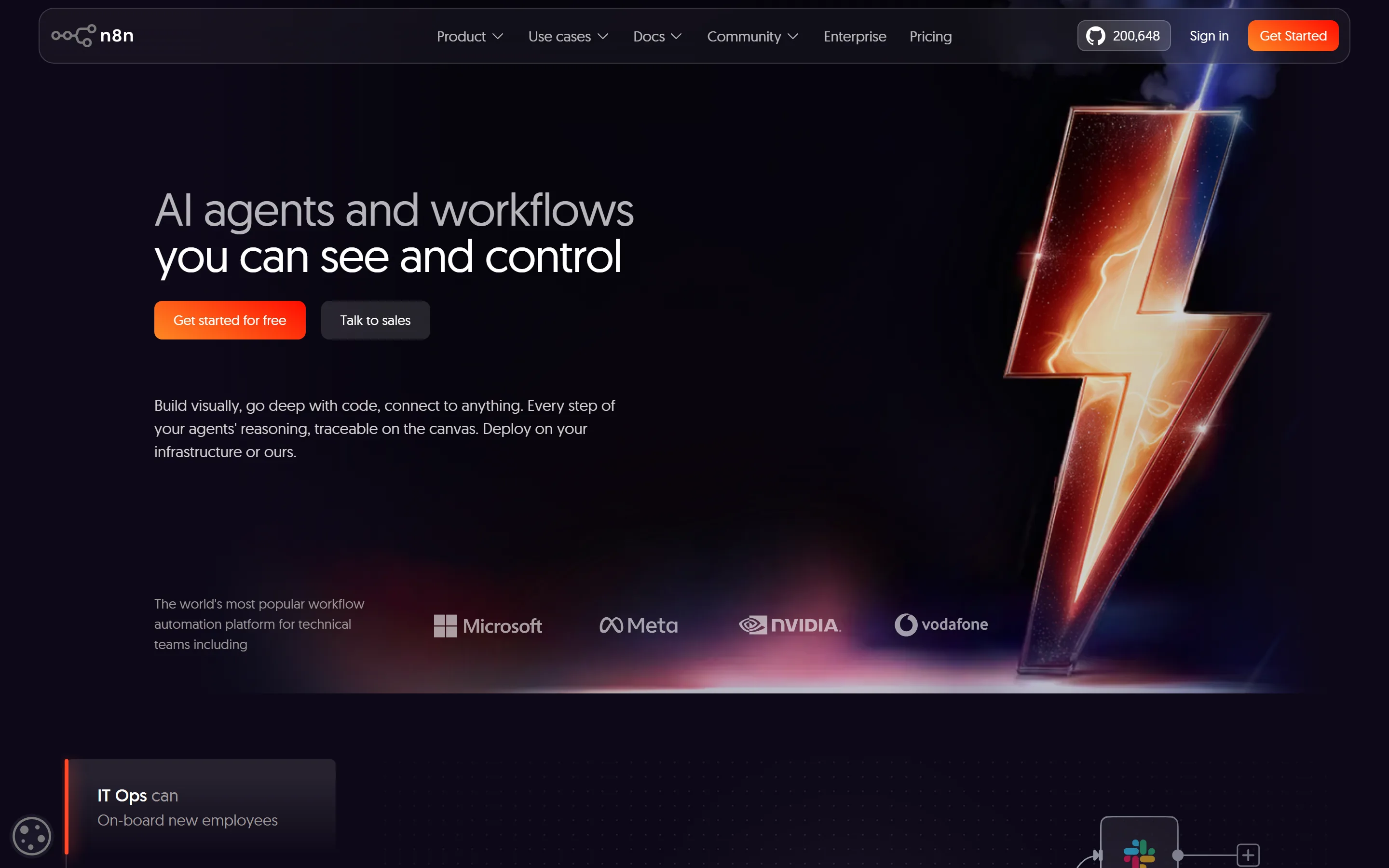
It is also, in n8n's own words on its homepage, “the world's most popular workflow automation platform for technical teams.” That phrase is doing a lot of work, and it is the single most useful sentence on their site for someone in your position. The vendor is telling you who the product is designed around. Most DIY guides skip straight past it.
The good news about the licence
One thing almost every review gets wrong: n8n's Community Edition is free to self-host, and the Sustainable Use License explicitly permits use “for your own internal business purposes.” A dental clinic running its own booking automation on its own server sits squarely inside that permission, at zero licence cost. The restriction only bites if you resell it as a service to others.
So if you have someone technical in the family, the software genuinely can cost nothing. That is a real point in favour of DIY, and I would rather say it plainly than pretend otherwise.
What it actually costs
Pricing is per workflow execution, not per step — a workflow with forty nodes costs the same as one with three. That is unusually generous and it matters for complex builds.
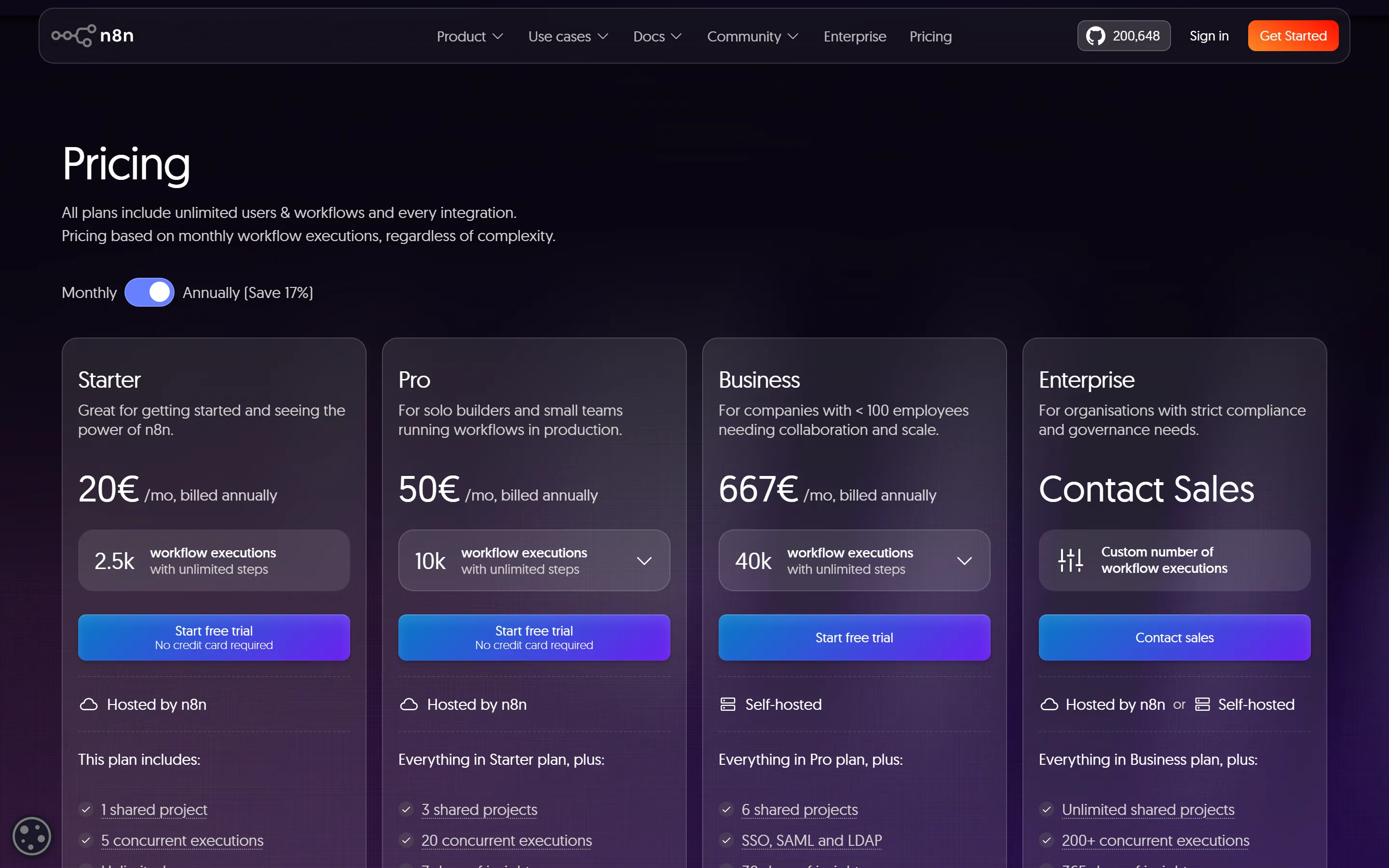
| Plan | Cost/mo (CAD) | Billed as | Executions/mo | Concurrent | Log retention |
|---|---|---|---|---|---|
| Community (self-hosted) | $0 licence | €0 | Unmetered | Your hardware | Your setup |
| Starter | $32 | €20 | 2,500 | 5 | 7 days |
| Pro | $80 | €50 | 10,000 | 20 | 30 days |
| Business | $1,070 | €667 | 40,000 | 200+ on Enterprise | Unlimited on Enterprise |
Annual billing. CAD figures converted at €1 = CAD $1.60, the ECB reference rate on 14 August 2026 — indicative only, since n8n charges in euros.
A Canadian detail nobody flags: n8n bills in euros, not dollars. Your real cost moves with the CAD/EUR exchange rate, so the number on your card statement drifts month to month even when your plan does not change. Budget with a buffer, and note that monthly billing costs about 17% more than annual.
The plan gap that catches people
Look at the jump from Pro to Business: $80 to $1,070 a month, with nothing in between. For a single clinic or trades business, Starter or Pro is almost certainly right — but if you grow into needing environments, Git version control or SSO, the next rung is a very long step up.
Monthly cost in CAD, converted at €1 = CAD $1.60, the ECB reference rate on 14 August 2026.
The interface is not the hard part
The canvas is clean and the editor is pleasant. Nodes snap together, you can run a single step to see its output, and the data preview panel shows exactly what each step produced. As software, it is well made.
The learning curve is in the concepts underneath: JSON, arrays, what “items” means when one trigger fans out into many, and expression syntax when a field needs a value from three steps back. Nothing about dragging a box teaches you those. This is where most owners I have spoken to stalled.
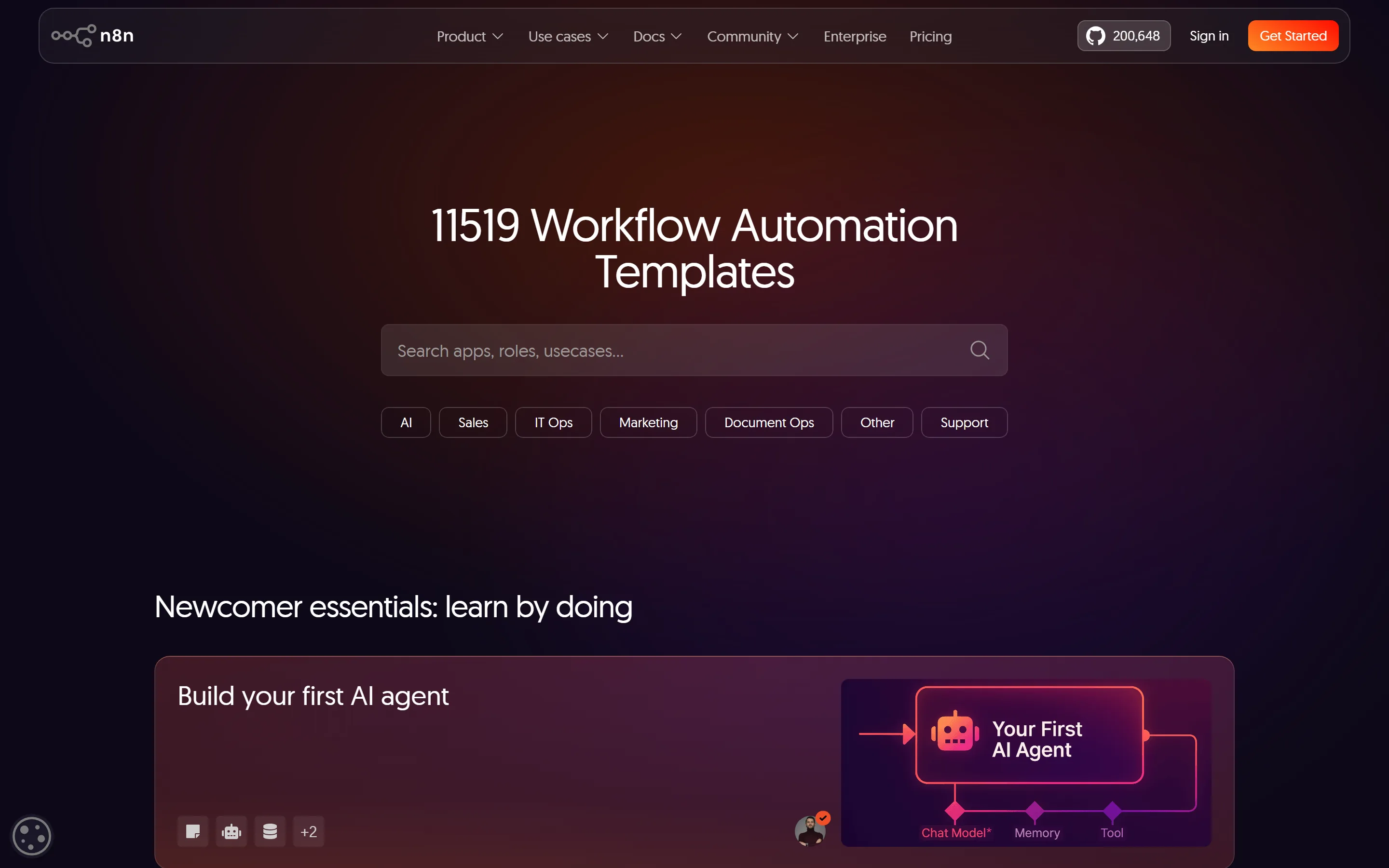
The template trap. Importing a template gets you to something that looks finished in about fifteen minutes. That feeling is misleading. Templates demonstrate a pattern; they are not built to survive your phone system, your booking software and your edge cases. The gap between “template runs” and “I trust this with a real customer” is where the bulk of the hours live.
What the build actually took
Timings below are from my own rebuild, working as someone who already knows the tool. If you are learning as you go, multiply them by three to five.
| Piece of the build | My time | Realistic first-timer |
|---|---|---|
| Account, telephony provider, number porting | 2 h | 6–10 h |
| Missed-call text-back | 1.5 h | 5–8 h |
| After-hours booking into the calendar | 5 h | 15–25 h |
| Three-touch follow-up with stop conditions | 3 h | 8–14 h |
| Error handling and alerting | 2.5 h | 6–10 h |
| Testing against real edge cases | 4 h | 10–20 h |
That lands a first-timer around 50 to 85 hours for a front desk they would actually trust. The most underestimated line is the last one. Testing is not “does it work” — it is “what happens when someone calls twice, replies STOP, then books anyway.”
Voice is the hard part, and it is not n8n's job
n8n orchestrates. It does not answer phones. A real AI receptionist needs a separate telephony and voice layer, which you configure and pay for on its own, then wire into n8n. If your mental model was “n8n replaces my receptionist,” adjust it now: n8n is the wiring between the voice provider, your calendar and your CRM. That is a meaningful extra system to learn, budget and maintain. Our guide to what AI automation actually involves covers the moving parts.
The maintenance nobody budgets for
Building is a project. Running is a habit. These are the recurring costs people miss entirely:
- Credentials expire. OAuth tokens for calendars and CRMs need periodic reauthorisation. When one lapses silently, bookings stop and you hear about it from a customer.
- APIs change. A provider renames a field and a workflow that ran for nine months breaks overnight.
- You are the on-call engineer. There is no support line for your specific build. On Starter you get the community forum, not email.
- Log retention is short. Seven days on Starter. If something broke ten days ago, the evidence is gone.
- Concurrency caps at five on Starter. Fine most days. A Monday morning rush is exactly when it is not.
Realistically, budget four to eight hours a month of your own time, concentrated unhelpfully into the weeks something breaks. Our breakdown of AI automation costs goes deeper on the running side.
Work out your own number
Generic advice is useless here, because the answer depends almost entirely on what your time is worth. Put your real numbers in.
DIY time-cost calculator
Pros and cons
What is genuinely good
- Free self-hosted licence for your own internal use
- Priced per execution, not per step
- 11,519 templates to learn patterns from
- You own it outright; nobody holds your workflows hostage
- Genuinely capable of anything an agency would build
- Large, responsive community forum
What will hurt
- The vendor positions it for technical teams, and means it
- 50–85 realistic first-build hours
- Voice needs a separate provider you also learn and pay for
- Forum-only support on Starter
- 7-day log retention makes older failures unforensic
- $80 to $1,070 plan gap with nothing between
- Euro billing adds exchange-rate drift
Who should build it themselves
Build it yourself if: you already write spreadsheet formulas for fun, you have 40+ hours you genuinely do not need elsewhere, your use case is one clear workflow rather than a whole front desk, and downtime costs you irritation rather than money.
Do not build it yourself if: the phone is your primary revenue channel, you are the only person who could maintain it, you need it working this month, or you are in a regulated space where a mishandled booking has consequences beyond an unhappy customer. Our comparison of automating versus hiring is a useful next read if you are weighing headcount instead.
A middle path most people miss: build the low-stakes automation yourself — review requests, internal alerts, a reporting digest — and hand off anything that touches a live customer at their first point of contact. You get the learning and keep the risk contained. The automation scorecard and the AI readiness assessment both take a few minutes and will tell you which of your processes fall where.
What changed in 2026
Two things shifted the calculation this year. The template library crossed eleven thousand workflows, so you are far less likely to be assembling from scratch. And AI credits are now bundled into the cloud plans (2,300/month on Starter, up to 13,700 on Pro), so model calls inside your workflows no longer necessarily need a separate billing relationship.
Both changes lower the entry barrier. Neither touches the maintenance burden, which is where DIY builds actually fail. The first hour got easier; the hundredth did not.
Where to start if you are doing this
- Start on the free trial rather than self-hosting. Learn the tool before you also learn server administration.
- Do the official n8n course before touching a template. Two hours there saves ten later.
- Build one workflow that touches no customer. Prove it survives a week.
- Add error handling before adding features. An automation that fails loudly is safer than one that fails silently.
- Keep the docs and the community forum open. Both are good.
Final verdict
n8n is a 9/10 product handed to an audience it was not designed for. The software is excellent, the pricing is fair, and the licence is more generous than people realise. None of that changes the fact that a front desk you would trust with real customers is a 50-to-85-hour project followed by an indefinite maintenance commitment you personally own.
If your time is worth less than about $40 an hour and you enjoy the tinkering, DIY wins comfortably. Above roughly $80 an hour it stops making sense on the first build, never mind the second year. Run your own numbers in the calculator above rather than taking my word for it — and if you would rather it were simply handled, that is what our workflow automation service exists for.
Method and sources
All pricing, plan limits and template counts were captured directly from n8n's own pages in August 2026 and appear in the screenshots above. Licence terms are quoted from the LICENSE.md in the n8n repository. Plan details are on the n8n pricing page and the template count on the template library.
Build timings are from my own rebuild of a clinic front-desk stack. First-timer estimates are professional judgement from onboarding owners who attempted this themselves, not measured data — treat them as informed ranges, not benchmarks.
Frequently Asked Questions
Partially. You can assemble simple workflows from templates without writing code. But the moment you need to reshape data between two systems, which happens in almost every real booking flow, you will meet expressions and JSON. That is where most non-technical builders stop.
The self-hosted Community Edition is free for your own internal business purposes under the Sustainable Use License. You still pay for the server plus any telephony, messaging or AI providers your workflows call. Cloud plans start at 20 EUR per month billed annually, roughly CAD $32 at current rates.
A weekend for something simple. Realistically 50 to 85 hours including testing to build a customer-facing front desk you would trust unsupervised.
Not on its own. n8n is the orchestration layer. Answering calls requires a separate telephony and voice provider that you set up, pay for and maintain separately, then connect to n8n.
You fix it. On the Starter plan support is the community forum, not a phone line, and execution logs are retained for seven days.
On software cost, always. On total cost it depends on what your hours are worth and whether you count them. Most owners are surprised by the first-year total once build hours are priced in.
Something that touches no customer: an internal alert, a reporting digest, or a review request sent a day after a completed job.
Yes, with two caveats. Billing is in euros so your cost drifts with the exchange rate, and you remain responsible for your own PIPEDA compliance including where self-hosted data lives.
Rather Have It Simply Handled?
Book a free 30-minute call. We will tell you honestly which parts you could build yourself and which are worth handing over — even if the answer is that you do not need us.
Book Your Free AI Assessment →