
Table of contents
Our Verdict & How We Tested
What actually moves the needle for a small business: the tool, or how you use it? Both — and that's why this guide exists.
One-sentence takeaway: every tool here can save you 10+ hours a week; the right pick depends on your patience, your budget, and whether you want to build it yourself.
What's covered: the five ways Canadian small businesses actually buy AI automation tools in 2026 — Zapier, Make, n8n, Lindy, and hiring out a custom build. This guide is for owners and office managers, not developers.
Why trust us: I'm Daria Morrison, co-founder of Avelle Solutions, an AI automation agency in British Columbia. We build custom AI agents and workflow automation for service businesses across BC. We use these exact platforms in client work every week — we pay for them, break them, and fix them.
Test window: ongoing client deployments through 2026, plus a fresh hands-on pass on each tool in July 2026 for this guide.
Selection criteria: under $100 USD/month to start, no code required to get value, strong AI features in 2026, and a real track record with business process automation for small teams.
Quick-Look Comparison (Tap a Column to Sort)
Short on time? This table is the guide in miniature. Click any column header to sort.
| Tool | Entry price (USD/mo) | Free option | Standout feature | Best for… |
|---|---|---|---|---|
| n8n ⭐ | $24 (or self-host free) | Self-hosted | Per-run pricing, real AI agents | Power & value as you grow |
| Zapier | $19.99 | Yes (100 tasks) | 8,000+ app connections | Fastest, easiest start |
| Make | $9 | Yes (1,000 credits) | Visual builder, lowest price | Budget visual thinkers |
| Lindy | $49.99 | Trial | AI assistant that reads email & chat | An "AI employee" feel |
| Custom build | $500+ CAD | — | Done for you, tuned monthly | Owners with no time to DIY |
Prices checked July 2026, annual billing where offered. All SaaS tools bill in USD — add roughly 35–40% for CAD.
The Best AI Automation Tools for Small Business in Canada, Reviewed
1. n8n
⭐ Best overall valueCould one tool handle simple zaps and full agentic AI workflows? n8n is the closest thing we've found.
What it is: a visual workflow automation canvas where you wire apps, logic and AI agents together. Ideal user: a small business that has outgrown simple triggers, or anyone with a slightly technical helper.
Specs & pricing tiers
- Cloud Starter: $24 USD/mo — 2,500 workflow runs
- Cloud Pro: $60 USD/mo — 10,000 runs
- Self-hosted Community Edition: free, unlimited runs (you supply a ~$5/mo server)
- Pricing is per execution: one run of your whole workflow counts once, no matter how many steps. Failed runs don't count.
Design & UX: a node-and-wire canvas. Less hand-holding than Zapier, far more control. The 2026 releases added drag-in AI agent nodes that plan multi-step tasks on their own.
Performance: a five-step lead-intake workflow (form → ChatGPT summary → CRM → Slack → email) costs one execution per lead on n8n. The same flow on per-step billing tools costs 5–6 units per lead — that math is the whole value story.

Why it matters: when a quoting workflow moves to self-hosted n8n, lead volume can triple without the software bill moving. That's the per-run model doing its job — and the reason it's our default stack for growing clients.
Pros: best price-to-power ratio, true AI agent support, self-hosting = Canadian data residency on your own server (a real control advantage). Cons: steepest learning curve here; cloud free tier is gone.
n8n's official 2026 quick-start: build your first AI agent.
2. Zapier
Easiest startWhat's the fastest way to feel the magic of automation? A Zapier "Zap" running ten minutes after you sign up.
What it is: the biggest name in no-code automation, connecting 8,000+ apps. Ideal user: a non-technical owner automating simple two-to-four step tasks between popular apps.
Specs & pricing tiers
- Free: 100 tasks/mo, two-step Zaps
- Professional: from $19.99 USD/mo (annual) — 750 tasks, multi-step Zaps, conditional paths
- Team: from $69 USD/mo — 2,000 tasks, 3+ users
- Billing is per task: every action step counts. A 5-step Zap = 5 tasks per run. Overages bill at 1.25×.
Design & UX: the friendliest builder in this list. Plain-language setup, huge template library, and AI Copilot now drafts Zaps from a text description.
Performance: rock solid on simple flows. Costs climb fast at volume — that 5-step Zap running 100×/day burns ~15,000 tasks a month.
Classic use case: a salon automating review requests (booking → wait a day → SMS ask) can build the whole flow on Zapier's free tier in one afternoon. It's the automation we most often recommend businesses try first — total software cost: $0.
Pros: zero learning curve, most integrations, great templates. Cons: priciest per unit of work at scale; per-task math punishes long workflows.
A full 2026 beginner's guide to Zapier.
3. Make
Best budget pickWant 80% of n8n's power with training wheels still on — for nine dollars? That's Make.
What it is: a visual automation workflow software platform (formerly Integromat) with 3,000+ apps. Ideal user: a budget-conscious owner who thinks in flowcharts.
Specs & pricing tiers
- Free: 1,000 credits/mo, 2 active scenarios
- Core: from ~$9 USD/mo — 10,000 credits, unlimited scenarios
- Pro: ~$16 USD/mo — priority execution, custom variables
- Billing is per credit: every module (trigger, action, filter, router) spends one credit per run. AI features can spend more.
Design & UX: the prettiest canvas here — round modules, animated data bubbles. Genuinely fun. Error handling menus run deeper than Zapier's.
Performance: the 10,000-credit entry plan is the most generous starting allowance in this round-up. Watch iterators: a loop over 50 rows spends 50+ credits in one go.
What it covers: Make Core comfortably runs quote intake, CRM marketing automation and invoice reminders for a typical trades or landscaping outfit — roughly $150 CAD for a whole year of software.
Pros: lowest paid price, generous credits, visual and satisfying. Cons: credit math surprises beginners; support is slower at the low tiers.
Make.com full beginner guide, January 2026.
4. Lindy
Best AI-assistant feelWhat if your automation didn't look like a flowchart at all — but like a new hire you brief in plain English?
What it is: an AI-agent platform where "Lindies" read your email, answer chats, book meetings and hand tasks to each other. Ideal user: an owner drowning in inbox and scheduling work.
Specs & pricing tiers
- Free trial: 7 days with starter credits
- Plus: $49.99 USD/mo — monthly task credits, 1,000+ integrations
- Credit-based: AI-heavy steps (reading, writing, deciding) spend more credits than simple actions.
Design & UX: you describe the job; Lindy drafts the agent. Closest thing here to "hiring" software. Less precise control than a canvas when flows get complex.
Performance: excellent at language-heavy work — email triage, meeting scheduling, lead qualification chat. Not the pick for heavy data plumbing between systems.
The experience: point Lindy at an intake inbox and it drafts replies, flags hot leads and proposes bookings — with a human approving sends until trust is earned. It feels less like software and more like using AI for business the way the ads promise.
Pros: fastest path to a real "AI employee," strong email/chat skills, pleasant to use. Cons: priciest SaaS entry here; credits burn fast on AI-heavy tasks; less deterministic than flowchart tools.
Independent Lindy review with a real automation demo, February 2026.
5. Custom-Built AI Agents (Agency Route)
Best done-for-youWhat's your hourly rate — and how many evenings do you want to spend debugging webhooks?
What it is: an agency (like ours) designs, builds and maintains custom AI agents on the tools above, tuned to your exact business process automation needs. Ideal user: an owner who wants outcomes, not a new hobby.
Specs & pricing tiers
- Typical CAD pricing: $500–$2,500/month depending on scope (see our cost guide)
- Includes design, build, integrations, monitoring and ongoing tuning
- Billed in CAD — no exchange-rate surprises
Design & UX: your "interface" is a monthly report and a phone number to call. The complexity lives on our side.
Performance: the same platforms, pushed harder: multi-agent workflows, voice agents, RAG knowledge assistants, controlled data handling with Canadian data residency options.
Real-world story: our 2026 client deployments — from the AI receptionist builds in this review to back-office automation — are documented on our case studies page.
Pros: zero learning curve for you, deeper builds than DIY, one accountable partner. Cons: highest monthly cost; you should see ROI math before signing — walk away from anyone who won't show it.
Side-by-Side: The Numbers That Matter
Which numbers should actually drive the decision? Two: what you pay to start, and how fast you get a working automation.
View as table
| Tool | Entry plan (USD/mo) |
|---|---|
| Make Core | $9 |
| Zapier Professional | $19.99 |
| n8n Cloud Starter | $24 (self-hosted: free) |
| Lindy Plus | $49.99 |
Price alone misleads: each tool bills a different unit (tasks vs credits vs executions). n8n's per-run model is why it wins on value as workflows grow.
View as table
| Tool | Minutes to first automation |
|---|---|
| Zapier | ~10 |
| Lindy | ~15 |
| Make | ~25 |
| n8n | ~45 |
n8n's 45 minutes buys you the most headroom later. Zapier's 10 minutes is unbeatable for a first taste.
Why the Sticker Price Is Not the Cost
The three big platforms bill on genuinely different units, and that decides your bill far more than the headline plan price does. Zapier counts a task per action, so a five-step workflow charges five. Make counts credits on a similar per-operation basis. n8n counts an execution — one workflow run is one execution regardless of how many steps it contains.
Which means the cheapest plan on paper can be the most expensive in practice, and the gap widens exactly as your automation starts working.
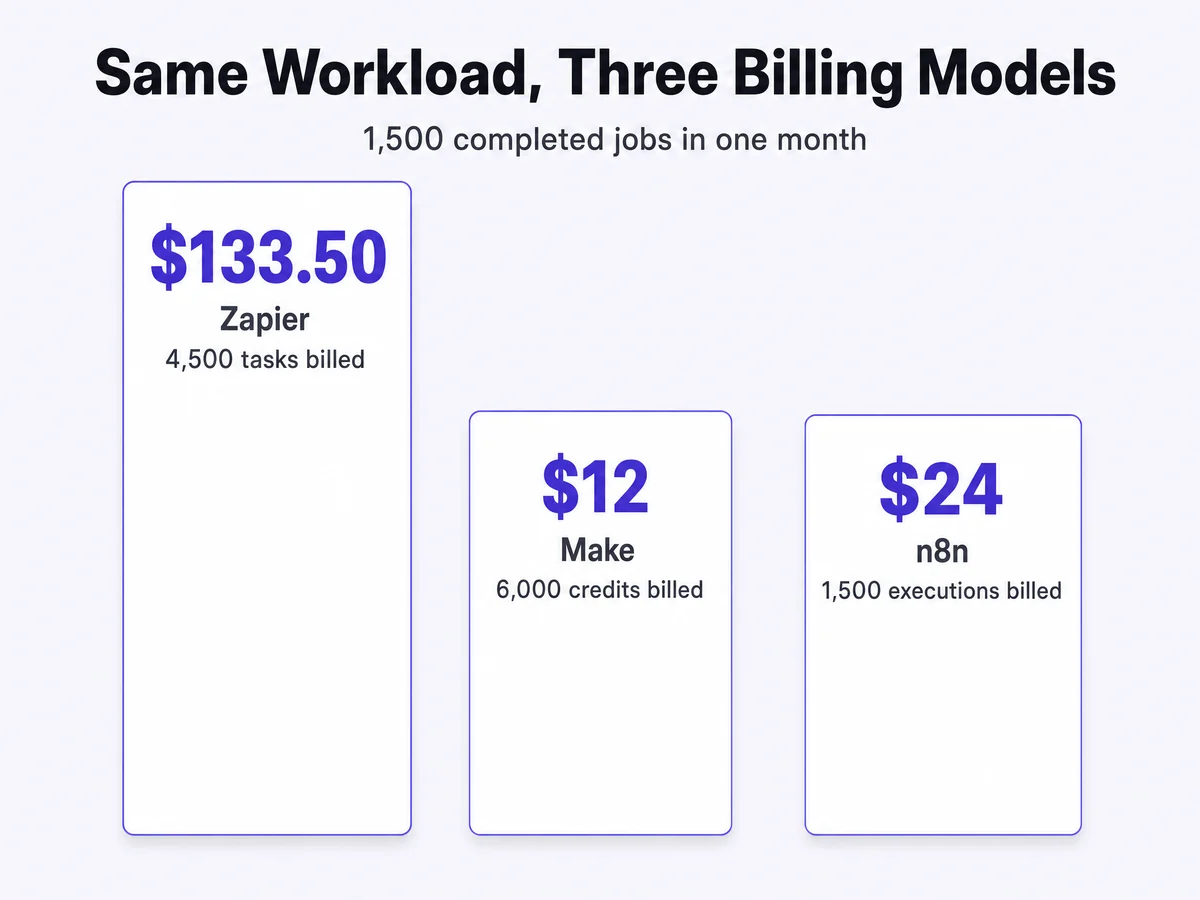
Before you pick on price, work out roughly how many steps your job has and how often it runs. A three-step workflow firing 50 times a day is 150 Zapier tasks a day and 50 n8n executions. That single ratio explains most of the bill-shock stories.
Onboarding Friction & Daily Use
How do these feel on a random Tuesday, three months in?
- Zapier: set-and-forget. You'll only log in when something breaks or a bill surprises you. Alerts are clear.
- Make: you'll peek weekly — the visual runs make debugging almost enjoyable. Credit dashboards need watching the first month.
- n8n: a tinkerer's home. Expect a learning week up front, then quiet competence. Self-hosters: budget an hour a month for updates.
- Lindy: feels like managing a keen junior employee — review its drafts for two weeks, then trust grows.
- Custom build: your daily use is reading a digest email. That's the product.
Best-For Scenarios: Match the Tool to Your Situation
Still torn? Find your row.
| Your situation | Our pick | Why |
|---|---|---|
| Tightest budget | Make | $9 entry, 10,000 credits, free tier to practice |
| Best overall | n8n | Grows from simple zaps to true agentic AI without repricing you |
| Total beginner | Zapier | Ten minutes to your first win, templates for everything |
| Power user / technical helper on staff | n8n self-hosted | Unlimited runs, your server, your data in Canada |
| Drowning in email & scheduling | Lindy | Language-first AI assistant, running in a day |
| No time to DIY at all | Custom build | Outcomes without the hobby — and CAD billing |
Alternatives Worth a Look
What about the tools that didn't make the core list?
- Microsoft Power Automate — if your world is already Microsoft 365, it's included in some plans and handles intelligent automation across Office well. Clunkier outside that bubble.
- Gumloop / Relay.app — younger AI-native builders with slick low code automation; promising, but smaller app catalogs in 2026.
- HubSpot workflows — if you live in HubSpot, its built-in CRM marketing automation may cover you before you need any of the above.
- Airtable automations — great when the database is the business; limited as a general hub.
Pricing Trends & Where to Buy
When's the smart time for a Canadian business to buy?
- Buy direct, always: zapier.com, make.com, n8n.io, lindy.ai. There are no legitimate resellers with better prices.
- Annual billing saves 15–33% across these tools. Go monthly for the first 60 days, then commit annual once the workflow sticks.
- USD creep is real: every SaaS tool here bills in USD. Budget ~1.4× in CAD and re-check your card statements quarterly.
- The 2026 trend: billing is shifting from "runs" to "AI credits" — AI-heavy steps cost more units everywhere. Estimate with your real volumes before committing.
- Watch for: Black Friday tier discounts (Make has a history of them) and startup programs (n8n offers 50% off Business for companies under 20 staff).
How Each Vendor Moved in 2026
Is the tool you pick today still the right tool next year? Momentum matters:
- n8n: doubled down on AI agent nodes and evaluation tools; the community template library exploded. Clear direction: agentic workflows for teams.
- Zapier: pushed Copilot (describe a Zap, get a Zap), Agents and Canvas — chasing the AI-native upstarts hard.
- Make: rolled out its credit-based model and AI tools across the canvas; expect deeper agent features through 2026.
- Lindy: shipping fast — agent swarms, phone calling, and a growing template gallery.
- Agencies (us included): the shift is from "automation projects" to managed AI agents for business — monthly-tuned systems, not one-off builds.
Final Verdict & Your Perfect Pick
The honest summary: Make if money is tightest, Zapier if time-to-first-win matters most, n8n if you want the most automation per dollar for years, Lindy if you want an assistant rather than a flowchart, and a custom build if you'd rather run your business than build robots. There is no wrong door — only a wrong amount of ambition for your patience level.
Or let the quiz decide in 30 seconds:
Evidence Vault
Where's the proof? Right here:
- Videos: each mini-review embeds a 2026-dated demo or tutorial — watch the tools work before you sign up.
- Pricing data: checked directly against vendor pricing pages in July 2026; the comparison table and charts above reflect annual billing.
- Hands-on experience: the "minutes to first automation" chart reflects our estimates from regular client work on these platforms; treat it as directional, not a lab benchmark.
- Client outcomes: our 2026 deployment write-ups live on the case studies page.
30-day follow-up note: we re-run this comparison quarterly. If a price or feature above has changed by the time you read this, the vendor links are the source of truth — and tell us so we can update the guide.
FAQ: AI Automation Tools in Canada
One more selection criterion: who owns the tool’s foundations. Nvidia’s $12.93B acquisition of Hugging Face is a reminder that this can change without warning.
It depends on your patience and budget: n8n for the best long-run value and power, Zapier for the fastest start, Make for the lowest price, Lindy for an AI-assistant feel, and a custom build when you want it done for you. The 30-second quiz above routes you to the right one.
No — Zapier, Make, n8n and Lindy all bill in USD, so budget roughly 1.4× the sticker price in CAD. Custom agency builds (like ours) bill in CAD with no exchange surprises.
Free tiers. Zapier's free plan (100 tasks) or Make's (1,000 credits) can run one real automation at zero cost. Self-hosted n8n is free forever if you supply a ~$5/month server.
Yes, but workflows don't transfer — you rebuild them. That's why we suggest picking the tool you can see yourself on in a year, not just the cheapest this month. Simple Zaps port to n8n in an afternoon; fifty of them is a project.
Want the "done-for-you" door?
Bring us one broken process. We'll map the automation live on a free call — and tell you honestly if a $9 Make plan is all you need.
Book a Free Consultation